Draw the signal path, not the boxes.
Drop devices from a symbol library, click port to port, and SignalFlow draws the cable — spaced, colour-coded and VLAN-aware.
Browser: nothing to install. Download: one file (1120 KB), works offline.
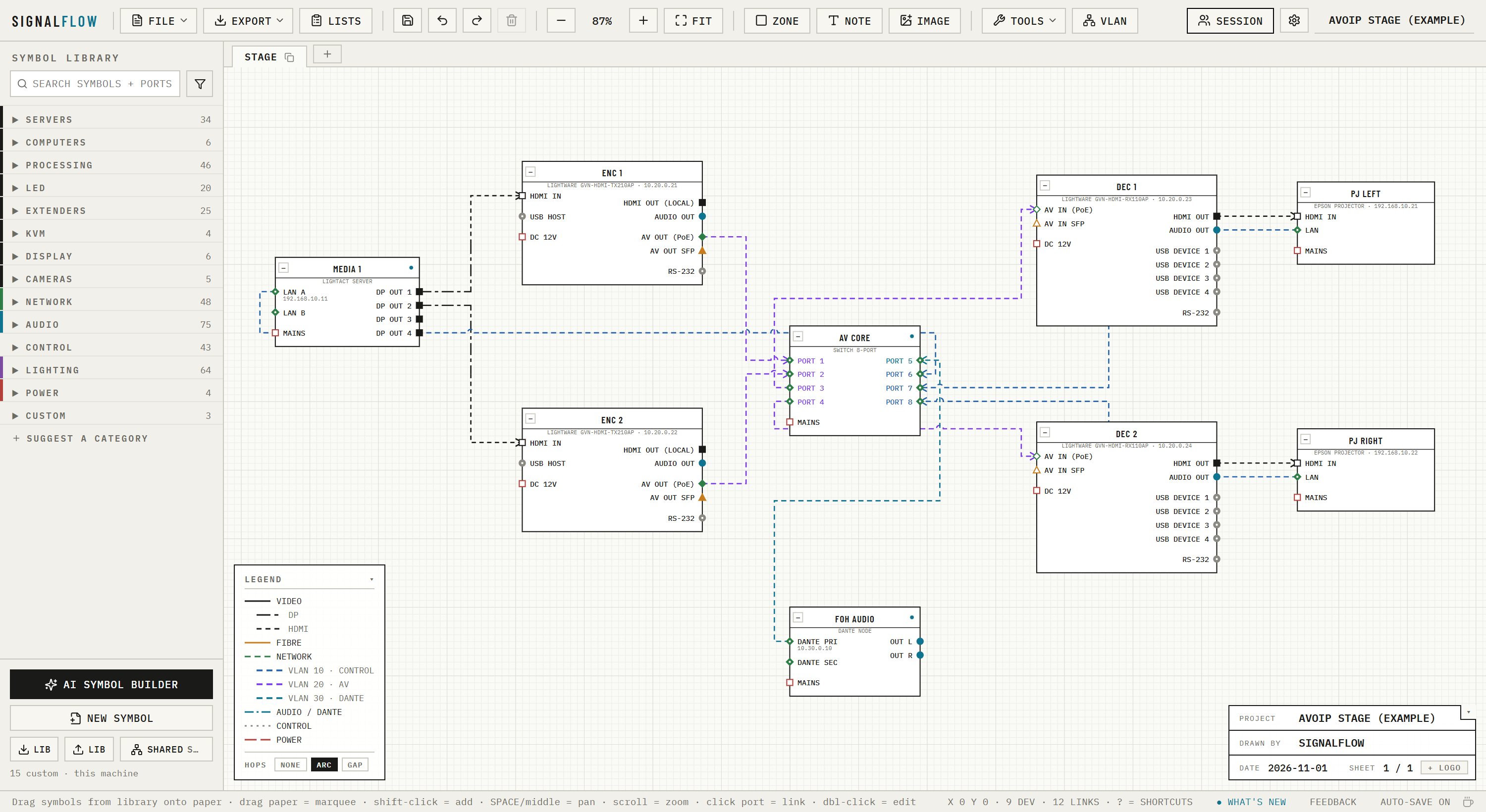
The legend is the feature list.
Every line below is drawn the way SignalFlow draws it on the sheet. Its whole job is to make the conventions you already use on paper happen by themselves on screen.
Symbols that know their ports
Nearly 190 devices built in, taken from the manufacturers' own spec sheets: media servers, switchers, LED processors, routers, extenders, openGear frames, Dante and more. Every port carries a signal and a connector, so SignalFlow refuses a cable that cannot exist and tells you which adapter the awkward ones need. Modular chassis take their real cards, and any placed device can be edited, collapsed to its patched ports, swapped for another model with its cables kept, or put back to the library version.
VLANs, trunks and addresses
Define a VLAN once (number, name, colour, subnet) and the ports, cables and legend take its colour. Ports can be access or trunk, carry tagged VLANs and join a LAG. Patch a Dante box set to VLAN 20 into a switch and the switch port becomes VLAN 20; give the VLAN a subnet and the box gets the next free address. Bring the plan in or take it out as a spreadsheet.
Auto-routing that stays legible
Click port to port and the cable is drawn. Cables that share a channel are spaced 5 px apart and ordered to cross each other as little as possible, so a 24-port fan-out reads as a bundle, not a smear. Double-click to add a bend, drag an end to re-patch, and choose arcs or gaps where lines cross.
Sheets and off-page flags
Split a big show across sheets that share one library and one VLAN registry. A cable can run from one sheet to another: each end gets a flag naming the far sheet, device and port, and double-clicking a flag takes you there. Ghost views fade everything but one signal, so the same drawing gives a video sheet, a network sheet or a power sheet, and a trace lights up one cable’s whole path from source to screen.
Zones, notes, title block
Box up a rack or a position as a zone (drag it and everything inside comes along), drop notes on the paper, and lay out the title block with the client's logo. Sixty steps of undo across everything, auto-save in the browser, and Ctrl+F finds any device, port, IP address or cable number.
The drawing is also the paperwork
Equipment, cable and switch-port lists come straight off the drawing, as CSV or one printable page. Each cable keeps its number for good, so labels you have already printed stay right when the drawing changes. The switch-port sheet lists spare ports too, and SignalFlow writes the switch configuration for NETGEAR M4250 switches, with a port map first so it can be checked before it is pasted.
Rack elevations from the same drawing
A RACKS tab draws every rack of the project, front, rear and side. Give a device a rack and a U, or drag it in; every built-in symbol knows its height, width, depth, weight, power and BTU/h, and where each connector sits on its panels, so the elevation is the real thing. Click a port to see where its cable goes, or click two to cable them there and then (the cable is on the schematic too), flip a device to mount it rear-facing, and print or save the racks as PDF.
Export that prints, files that diff
Print or save a PDF at real paper size (A4, A3 or A2) with the legend and title block sized to the page, or save the sheet as SVG, all of them filtered to one signal if you like. Drag the page frame on the drawing to choose what lands on the paper. Projects are plain .signalflow.json files, saved straight back to the same file in Chrome and Edge: keep them in version control, compare revisions, hand them to the next operator.
- Click port to port; cables route themselves, evenly spaced, with as few crossings as possible
- Routed mode with waypoints; double-click to add a bend; drag an end to re-patch
- Arcs or gaps where lines cross
- Several sheets, with off-page flags that jump to the far end
- Zones that carry what is inside them, notes, page frame, title block with a client logo
- Collapse a device to the ports in use
- Ghost views: one signal at full strength (
Alt+1…6), followed through fibre and AV-over-IP - Trace (
T): one cable’s whole path, source to every destination, across sheets - Find (
Ctrl+F) a device, port, IP or cable number - Link several devices at once with Link…
- Live sessions: send a link and draw together, with everyone's cursor on the sheet and your own undo
- Nearly 190 built in, from the manufacturers' spec sheets: disguise, Barco, Lightware, Blackmagic, Brompton, Megapixel, NovaStar, PIXERA, Pixelhue, Analog Way, AJA, Ross, Audinate, Leader and more
- Modular chassis with real cards, and saved card setups
- Every port has a signal and a connector: impossible cables are refused, adapters flagged, breakout DACs and copper SFP modules understood
- Edit one placed device, or put it back to the library version
- Swap one device, or several, for another model and keep the cables
- AI builder: type a model number or drop in a rear-panel drawing
- Shared library that syncs to everyone, with symbol submissions
- VLAN registry: name, colour, subnet; save your house scheme as the default
- Import and export VLAN lists as a spreadsheet (CSV) or a SignalFlow file
- Access and trunk ports, tagged VLANs, LAGs
- Switch ports take the VLAN of the device patched in; Fill switch ports does a whole drawing at once
- Automatic IP addresses from a VLAN's subnet, never duplicated
- Switch configuration written for NETGEAR M4250, with a port map
- Equipment, cable and switch-port lists, as CSV or a printable page
- Cable numbers that stay put (C001…), with Renumber when you want a clean set
- Print / PDF at A4, A3 or A2; SVG export; either filtered to one signal
- Save to the same file again (Chrome, Edge), auto-save, 60 steps of undo
- Plain
.signalflow.jsonfiles - Runs in the browser or offline from one file; every version stays openable
Type a model number. Get the symbol.
The device you need is rarely in anyone's library. SignalFlow can research it from the manufacturer's spec pages, or read a rear-panel drawing you drop in, and hand you a symbol to check before it's added.
Type "NETGEAR M4250-26G4F-PoE+", or drag in a rear-panel PDF, drawing or photo.
Two passes: extract, then verify every port-bank count against a page that actually states it. The result shows the source URL and the sentence it read.
Labels, sides, signals and connectors are all editable in the preview. Anything the engine couldn't support with evidence is flagged in amber, not slipped in.
✓ POE+ 1G ×24 · 1G ×2 · SFP ×4
✓ OOB MGMT · CONSOLE RJ45 · CONSOLE USB-C · USB-A · AC IN C14
source netgear.com/…/gsm4230p/ (GSM4230P)
quote "24 x 1G PoE+, 2 x 1G, 4 x SFP"
every bank count found on the page
| Engine | What you need | What it costs |
|---|---|---|
| Any AI agent | An agent you already use | Nothing extra |
| Claude API | Your own API key | Per request, billed to you |
| Local bridge | Node + Claude Code, signed in | Your existing subscription |
If a device's port counts can't be found on a readable page, the builder says so instead of guessing — a wrong symbol is worse than no symbol.
Two ways in. Same app.
Both keep your projects as files on your own machine. Custom symbols live in the browser you use; the shared library syncs in on its own.
Online
Recommended- Open the link. That's it — nothing to install, nothing to update.
- Save projects with the Save button; they download as
.signalflow.json. - Works in any current browser on Windows, macOS or Linux.
Local
Offline · your desktop- Download, unzip anywhere, double-click
signalflow.html. - Identical app, runs from a file, no network needed for drawing.
- The zip also holds the AI bridge and its launchers, for when you want research.
Want AI research? Three steps, once per machine — optional
Only for the local-bridge engine
Research runs through a small local bridge on your own Claude Code login, so nothing is metered to a shared key. Online users grab SignalFlow-bridge.zip; the local download already includes it.
- Install Node.js (LTS).
- Install Claude Code and sign in:
npm install -g @anthropic-ai/claude-codethenclaude login. - Double-click
SignalFlow.bat(Windows) orsignalflow.command(macOS). It starts the bridge and opens the app; the AI builder switches to the bridge engine by itself. Stuck?node sf-bridge.mjs testtells you why.
Symbols travel.
Build a device once and every SignalFlow can have it. Submissions are reviewed before they go global, so the library stays clean.
Hover a custom symbol in the library, click ⇡. A pre-filled GitHub issue opens — press submit. A GitHub login is all it takes.
A workflow validates the JSON and posts the port table back on the issue within a minute.
One label approves it; closing the issue declines it. Same id again means an update, not a duplicate.
Every app pulls the library on launch and every 30 minutes. Updated symbols replace local copies unless they're placed on a sheet.
Library repo: github.com/MattVillis/signalflow-symbols · shared symbols are generic — VLAN and IP assignments never leave your project.
Where it is going.
In use on real shows. Releases follow plain version numbers: a patch fixes bugs, a minor version adds features, a major version would only change the file format. Everything that has shipped so far is in the release notes — your bug reports shape what comes next.
- Live sessions: send a link and draw the same show together, cursors and all, with nothing to install.
- Trace a signal end to end: select a cable, press T, and its whole path lights up across every sheet.
- Zones carry what is inside them: move a rack and its kit comes along.
- Switch ports take the VLAN of whatever is patched into them, and one button fills in a whole drawing.
- Cable numbers that stay put, so printed labels survive the next revision.
- Replace several devices at once, or put a hand-edited device back to the library version.
- VLAN plans in and out as a spreadsheet, and switch configuration written for NETGEAR M4250.
- Save straight back to the file you opened, in Chrome and Edge.
The list is clear. What gets built next comes from the people drawing shows with it: if something slows you down, or a device you use is missing, say so.